













Worked example: a 25-block ring
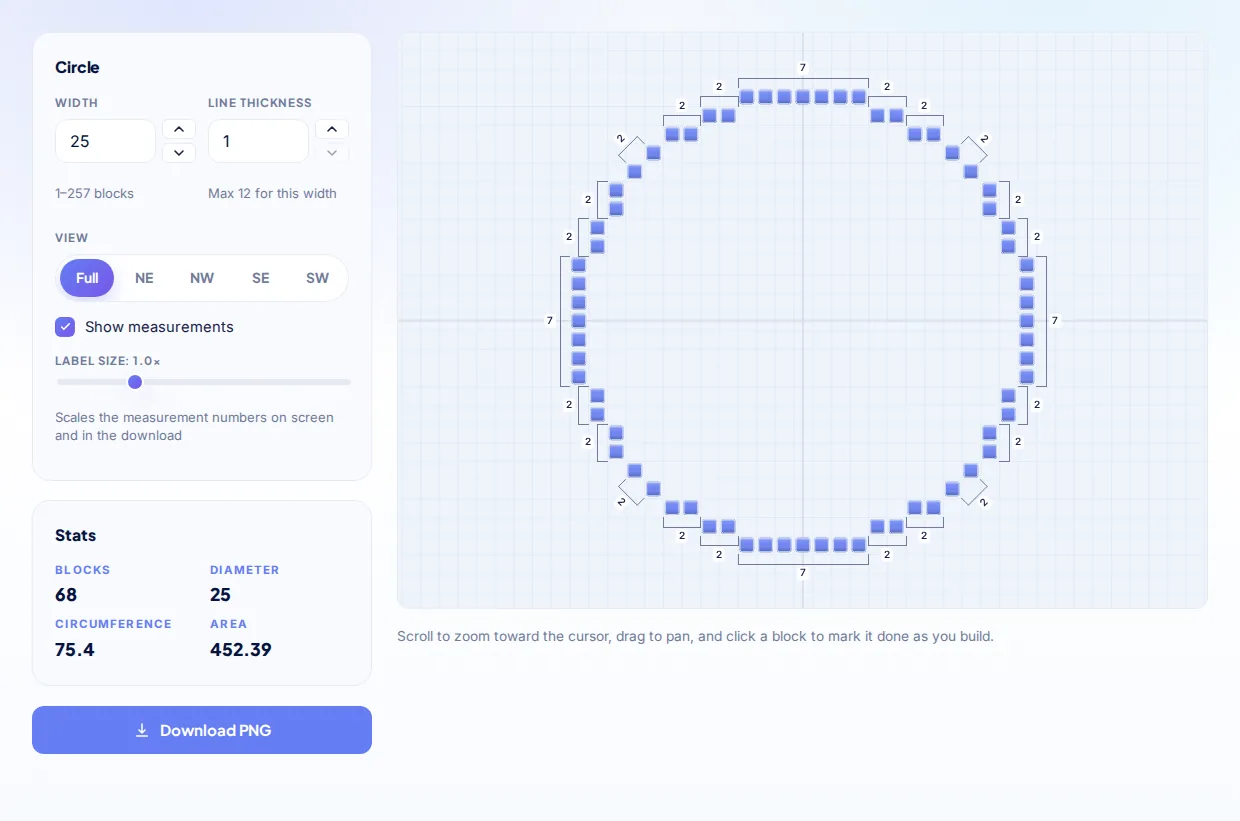
Say you want a round tower base 25 blocks across. Set Width to 25 and Line thickness to 1, or open this 25-block ring directly. The generator lays out 68 blocks around a single middle block, 12 blocks in from each edge.
Build it one corner at a time
The ring repeats the same pattern around each corner, so you only need to learn one stretch. Start at the middle of the north edge and work clockwise:
- Place a straight run of 7 blocks, centred on the middle column.
- Step down one row and out one column, then place 2 blocks.
- Step again and place 2 more.
- Place 2 single blocks that touch only at their corners. This is the diagonal.
- Turn downward: place 2 blocks in a column, then step out and place another 2.
- You are now at the east edge. Place its run of 7, then repeat the pattern for the next corner.
That is 7 blocks per edge and 10 per corner: 4 × 7 + 4 × 10 = 68. If your count is off, switch the View to one quarter. The tool zooms in and labels every run in that section, and you can click blocks to mark them as placed while you work.
Circle geometry does not depend on the game version, so the same layout works in every Java and Bedrock release.